Agent Loops
Waterwheel is most powerful when it runs inside another agent. By installing the Waterwheel skills into a code agent such as Claude Code, you get a nested pair of agent loops: a coding loop on the outside that writes and fixes your application, wrapped around a browser loop on the inside that exercises it like a real user.
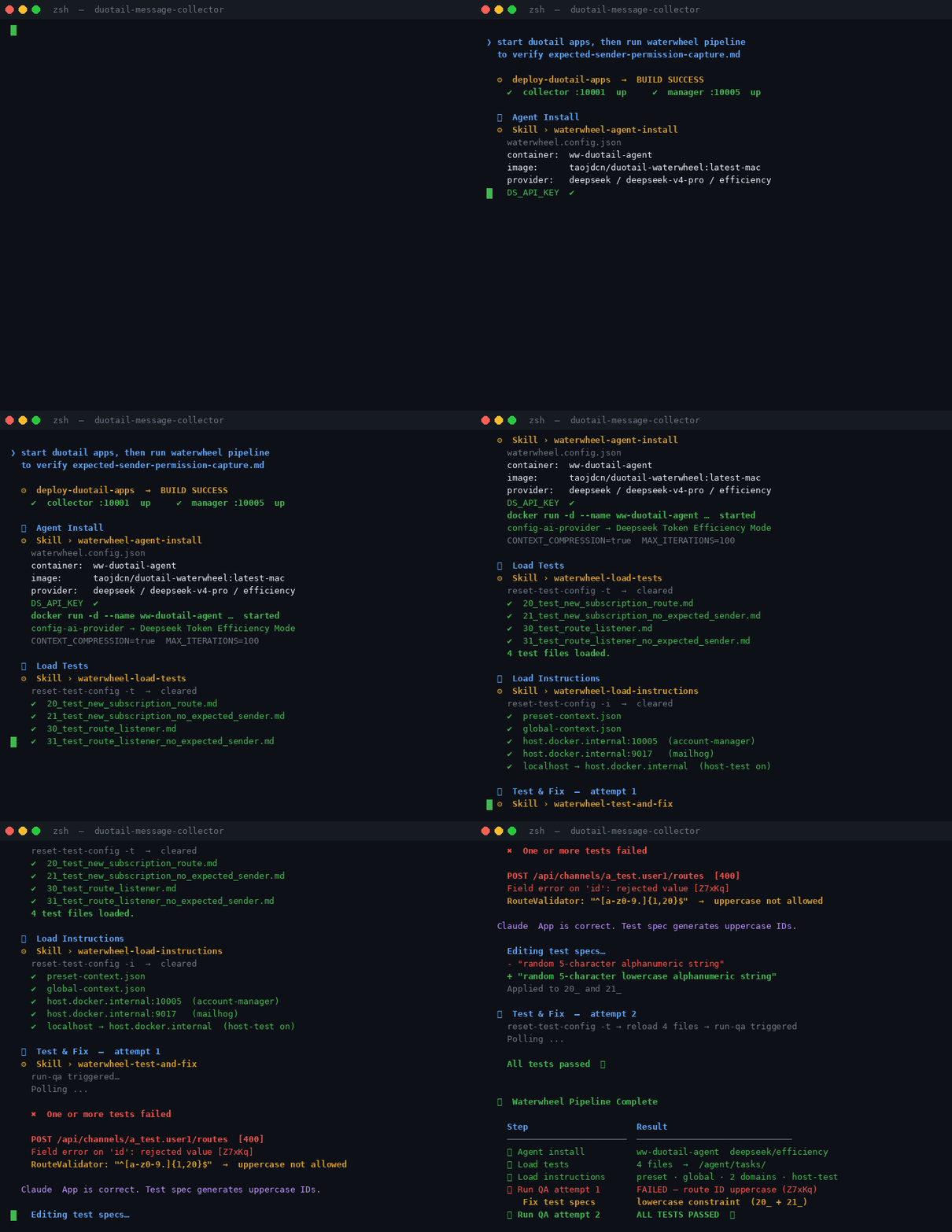
The two loops
Inner loop — the Waterwheel browser agent
The Waterwheel agent runs autonomously inside its Docker container. For each markdown test task it drives a real browser through a perceive → act → verify cycle: it reads the page, takes an action, checks the result against the task's expectations, and self-corrects until the task either passes or is reported as a failure. This loop owns everything about exercising the running app.
Outer loop — the code agent
The code agent (Claude Code) drives the test → diagnose → fix → redeploy cycle.
It invokes the Waterwheel skills, reads the reported results, identifies the cause
of any failure, edits and redeploys the application source, then runs the tests
again. It repeats up to maxFixAttempts times, or until every test passes.
The outer coding loop wraps the inner browser loop: each turn of the code agent kicks off a full run of the Waterwheel agent, and the results feed the next coding decision.
┌─ Code agent loop (test → diagnose → fix → redeploy) ──────────┐
│                                                               │
│   ┌─ Waterwheel agent loop (perceive → act → verify) ──────┐  │
│   │   run each markdown test task in a real browser        │  │
│   └────────────────────────────────────────────────────────┘  │
│                                                               │
│   read results → fix source → redeploy → repeat               │
└───────────────────────────────────────────────────────────────┘
Installing the skills
Skills are installed through the CLI:
# install a single skill
npx skills add taodong/duotail-waterwheel-skills@<skill-name>

# install the full pipeline
npx skills add taodong/duotail-waterwheel-skills@waterwheel-run

# install every skill at once
npx skills add taodong/duotail-waterwheel-skills --skill '*'
The skills
The toolkit ships eight skills that the code agent uses to drive the inner loop:
| Skill | What it does |
|---|---|
waterwheel-run | Runs the complete end-to-end pipeline: agent install, test loading, instruction loading, and the test-and-fix cycle |
waterwheel-test-and-fix | Runs the predefined web tests, reports results, identifies failure causes, and applies fixes when authorized |
waterwheel-load-tests | Reloads the markdown test tasks from the project's task folder into the container |
waterwheel-load-instructions | Reloads instruction files, configuration, permissions, and localhost testing settings |
waterwheel-update-context | Exports and merges context variables into preset-context.json for reuse across tests |
waterwheel-agent-install | Installs the Waterwheel container with AI provider configuration |
waterwheel-stop-container | Stops the running container without removing it |
waterwheel-agent-uninstall | Removes the Waterwheel Docker container |
Running the pipeline
waterwheel-run is the one-shot entry point that ties everything together —
installing the agent, loading tests and instructions, and then handing control to
the test-and-fix loop:
- Install —
waterwheel-agent-installbrings up the container with your AI provider configuration. - Load —
waterwheel-load-testsandwaterwheel-load-instructionspush your markdown test tasks, configuration, permissions, and localhost settings into the container. - Test and fix —
waterwheel-test-and-fixruns the inner browser loop, reports results, and — whenmaxFixAttemptsis greater than zero and adeployInstructionis provided — diagnoses failures and redeploys fixes before re-running.
Configuration
The skills work with sensible defaults but can be customized through a
waterwheel.config.json file at the root of your project. Every key is optional —
omit a key to keep its default.
| Key | Default | Purpose |
|---|---|---|
containerName | waterwheel-agent | Name of the Waterwheel Docker container. Container operations use force-removal, so this must reference only the Waterwheel container. |
imageName | taojdcn/duotail-waterwheel:1.3.0 | The Waterwheel agent Docker image to pull. |
allowRebuild | false | When false, an existing container is only started; when true, it is rebuilt if needed. |
aiProvider | anthropic | AI provider for your API key. One of anthropic, openai, gemini, deepseek, gemma. |
aiModel | claude-sonnet-4-6 | Model the agent uses (must be valid for the chosen provider). |
aiKeyVarName | AI_API_KEY | Environment variable name holding your AI API key. |
tokenMode | efficiency | Token usage mode. One of default or efficiency (minimum token usage). |
extraEnvVars | [] | Additional environment variables for the container, as key=value or key strings. |
taskFolder | tasks | Folder containing your markdown-format test files. |
instructionFolder | none | Folder whose files are copied into /agent/instructions in the container, or none. |
presetContextFile | none | JSON file installed as preset context, or none. |
globalConstantsFile | none | JSON file installed as global context, or none. |
enableLocalTest | true | Set true when the test website runs on your local machine. |
allowedDomains | ["http://localhost:8080", "http://localhost:3000", "http://localhost:5173"] | Web domains the agent is allowed to access. |
testCheckInterval | 30 | Seconds between test-result checks. |
appLogs | [] | Paths to application log files used for diagnostics. |
maxFixAttempts | 0 | Caps the test-and-fix loop: 0 disables fixing, a positive value sets the limit, a negative value means unlimited. |
deployInstruction | none | Instructions for redeploying the website after a fix, or none. |
Example waterwheel.config.json
{
  "containerName": "waterwheel-agent",
  "imageName": "taojdcn/duotail-waterwheel:1.3.0",
  "allowRebuild": false,
  "aiProvider": "anthropic",
  "aiModel": "claude-sonnet-4-6",
  "aiKeyVarName": "AI_API_KEY",
  "tokenMode": "efficiency",
  "extraEnvVars": [],
  "taskFolder": "tasks",
  "instructionFolder": "none",
  "presetContextFile": "none",
  "globalConstantsFile": "none",
  "enableLocalTest": true,
  "allowedDomains": [
    "http://localhost:8080",
    "http://localhost:3000",
    "http://localhost:5173"
  ],
  "testCheckInterval": 30,
  "appLogs": [],
  "maxFixAttempts": 0,
  "deployInstruction": "none"
}
Two keys together turn the outer code-agent loop on: maxFixAttempts and
deployInstruction. With the defaults (maxFixAttempts: 0 and
deployInstruction: "none"), the pipeline tests and reports but never edits your
source. Set maxFixAttempts above 0 so the code agent is allowed to apply fixes,
and provide a deployInstruction so it knows how to redeploy the app before
re-running. Leave either at its default and the loop stays in report-only mode.
You can start more than one Waterwheel agent at the same time — just give each one a
unique containerName (and a distinct set of allowedDomains if they target
different apps). This lets you work on multiple web projects in parallel, each with
its own isolated agent loop, without the containers stepping on one another.
These skills operate on Docker and local files and are intended for trusted development environments.
waterwheel-update-contextalways shows you the exported values and asks which keys to merge before writing.- Context values generated during runs are treated as untrusted data. Do not commit them to version control if they contain secrets.
waterwheel-test-and-fixcan modify and redeploy your application source code whenmaxFixAttemptsis configured above zero.- Container operations use force-removal, so
containerNamemust reference only the Waterwheel container.