Manage Test Tasks
All test tasks scheduled to run by the agent must be plain-text Markdown (.md) files placed under the /agent/tasks directory.
The agent runs all tests in sequence, following their natural dependencies.
We use Markdown files for test tasks because LLMs excel at understanding Markdown. In our implementation, the agent uses the .md file extension to identify task files only. There is no required Markdown format for test files. You can use plain text to describe your task without any Markdown styling. If you are not familiar with Markdown, we recommend breaking your task into ordered, numbered steps, which can significantly reduce token consumption.
1. Go to https://www.wikipedia.org.
2. Click "English" language
3. Verify the banner text "Welcome to Wikipedia" is displayed
File Location and Structure
- Place test files under
/agent/tasks. - Use the
.mdextension. - Each file contains two parts:
- Optional YAML front matter properties
- Test instructions, ideally in Markdown format
---
name: Register and Activate Account
id: 2
release: 0.3.0
ticket: Bug-002
---
# Register and Activate Account
Run the registration and activation flow.
Supported YAML Properties
Standard Fields
-
name(optional)- Human-readable test name.
- If omitted, the filename is used.
-
id(optional)- Test identifier, stored as text.
- If omitted, the filename is used.
Custom Fields
Any property key not in the reserved list is treated as custom metadata and exported under customFields in test-results.json.
Reserved keys: name, id, node, required, ignore
node, required, and ignore are reserved but no longer read from front-matter — they are silently ignored if present. Define them in preset-context.json under the flow key instead.
Custom field behaviour:
- Values are copied into
customFieldsand converted to text. - Output shape:
Record<string, string>
Define Test Flow
A flow defines the execution order of your tests and the dependencies between them. It is configured by the flow array in preset-context.json, which maps each task file to a node, optional required dependencies, and an optional ignore flag. Keeping the flow separate from the test content means the same .md file can be reused across different suites or environments without modification — only preset-context.json changes.
When flow is absent, every task runs as an independent test in discovery order.
Flow Configuration
Each entry in the flow array supports the following fields:
| Field | Type | Required | Description |
|---|---|---|---|
file | string | yes | Exact basename of the task file (e.g. login.md). Must match a file in /agent/tasks. |
node | number | no | Node number for grouping and dependency references. |
required | number | number[] | no | Node number(s) that must succeed before this task runs. |
ignore | boolean | no | If true, the task is skipped and excluded from dependency evaluation. |
- Task files with no matching flow entry run as independent tests (no node, no required).
- A
flowentry whosefiledoes not match any discovered task file is a fatal error — the agent exits immediately. - When
flowis absent, all tasks run as independent tests.
{
  "flow": [
    { "file": "login.md", "node": 1 },
    { "file": "checkout.md", "node": 2, "required": [1] },
    { "file": "smoke.md", "ignore": true }
  ]
}
Test Types
Independent Test
A test with no required entry in the flow configuration.
- Always eligible to run.
- May or may not have a
nodeassigned in the flow configuration.
---
name: Open Home Page
id: 1
---
# Open Home Page
Open the home page and verify it loads correctly.
Dependent Test
A test with a required entry in the flow configuration.
- Runs only when the required nodes satisfy the dependency rules.
- Configure
nodeandrequiredinpreset-context.json, not in front-matter.
---
name: Purchase Plan
id: 3
---
# Purchase Plan
Purchase a subscription plan.
{
  "flow": [
    { "file": "purchase-plan.md", "node": 2, "required": 1 }
  ]
}
Dependency Check Rules
For a dependent test, the agent evaluates the required nodes against tests that appear earlier in the run:
- If all required nodes are
success→ execute the test. - If any required node is
abort→ set the current test toskipped. - If any required node is
skipped→ set the current test toskipped. - Otherwise → set the current test to
abort.
Additional rules:
- If no test is found for a required node among earlier tests, the current test becomes
abort. - If multiple tests share the same
node, that node issuccessonly when all tests on that node succeed. - Ignored tests are excluded from node evaluation.
The diagram below shows these rules in action across a single run: node and required chain the tests together, and a non-successful node cascades downstream — first as abort, then as skipped.

Test Status
| Status | Meaning | Typical Trigger | Dependency Impact |
|---|---|---|---|
queued | Initial state before the execution decision. | Loader initialises test entries. | Not treated as satisfied. |
ignored | User intentionally excluded this test from the run. | ignore: true in the flow configuration. | Excluded from dependency evaluation. |
success | Test executed and passed. | Task run completes successfully. | Satisfies required node checks. |
failed | Test executed but failed. | Task run completes with failure. | Does not satisfy required node checks; dependent tests become abort unless an abort or skipped rule applies first. |
abort | Test did not run because dependency requirements cannot be satisfied. | Dependency checker cannot validate required nodes as successful. | Causes dependent tests requiring that node to become skipped. |
skipped | Test was planned but could not run due to upstream dependency state. | Any required node is abort or skipped. | Causes downstream dependent tests requiring that node to become skipped. |
ignored vs skipped
These statuses are distinct:
ignored: the test was intentionally excluded from this run viaignore: truein the flow configuration.skipped: the test was intended to run but could not, due to an upstream dependency failure.
Behavioural differences:
- Ignored tests are sorted to the top of the run list before all other tests.
- Ignored tests are never executed.
- Ignored tests do not satisfy dependencies, even if they declare a
node.
Authoring Patterns
Pattern A — Independent test, no node
---
name: Test 1
id: 1
---
# Test 1
...
Pattern B — Independent test on a node
Task file:
---
name: Test 2
id: 2
---
# Test 2
...
Flow configuration:
{
  "flow": [
    { "file": "test-2.md", "node": 1 }
  ]
}
Pattern C — Dependent test with one required node
Task file:
---
name: Test 3
id: 3
---
# Test 3
...
Flow configuration:
{
  "flow": [
    { "file": "test-3.md", "node": 2, "required": 1 }
  ]
}
Pattern D — Dependent test with multiple required nodes
Task file:
---
name: Test 4
id: 4
---
# Test 4
...
Flow configuration:
{
  "flow": [
    { "file": "test-4.md", "required": [1, 2] }
  ]
}
Pattern E — Ignored test with custom metadata
Task file:
---
name: Experimental Flow
id: 9
release: 0.3.0
owner: qa-team
---
# Experimental Flow
...
Flow configuration:
{
  "flow": [
    { "file": "experimental-flow.md", "node": 5, "required": 1, "ignore": true }
  ]
}
Output Mapping Reference
Runtime Result Fields
| Field | Notes |
|---|---|
name | Always present |
file | Always present |
id | Always present |
status | Always present |
result | Always present |
node | Present if validly parsed |
required | Present if validly parsed |
customFields | Present if custom fields were defined |
Dry-run Plan Fields
| Field | Notes |
|---|---|
name | Always present |
file | Always present |
id | Always present |
status | Always present |
node | Present if validly parsed |
required | Present if validly parsed |
customFields | Present if custom fields were defined |
Pass Data Between Tests
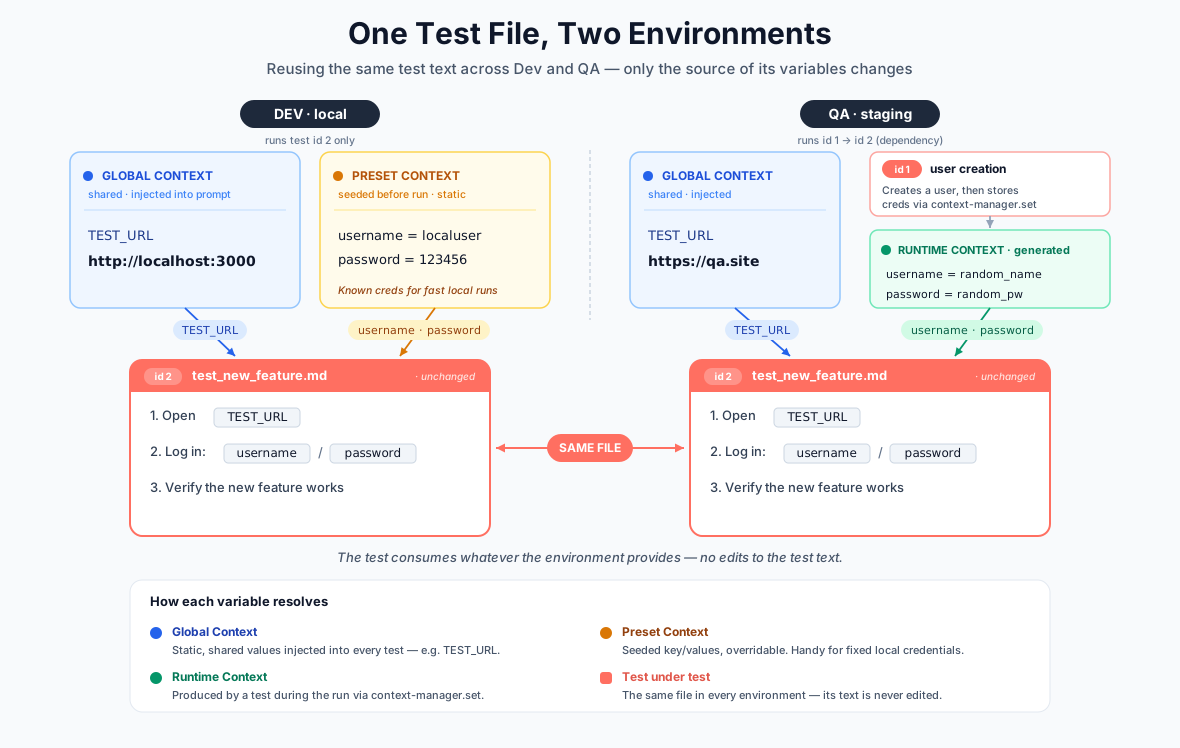
Waterwheel gives a test access to data from three layers, so you rarely need to hard-code values into a test file. Global context supplies static, shared values (base URLs, tenant IDs) that are injected into every test; preset context seeds key/value pairs before the run that a test can read or override; and runtime context carries values that one test discovers and stores via context-manager.set for later tests to consume. Because a test references its inputs by name rather than by value, the same test file can run unchanged across environments — only the source of each variable changes.
The example below shows this in action: the test_new_feature.md file is byte-for-byte identical in Dev and QA, yet in Dev its credentials come from a static preset, while in QA they are generated at runtime by a prerequisite user-creation test.
A. Global Context — static values shared across all tests
The agent supports a global context file configured by the GLOBAL_CONTEXT environment variable. The default path is /agent/instructions/global-context.json. Use this for fixed environment data such as base URLs, shared accounts, or tenant IDs.
{
  "BASE_URL": "https://staging.example.com",
  "TENANT": "acme",
  "SUPPORT_EMAIL": "qa@example.com"
}
Use uppercase variable names in global-context.json to avoid naming conflicts with runtime context variables.
B. Preset context (default values and flow control)
- The agent supports a preset context file configured by
PRESET_CONTEXT. - Default file path is
./instructions/preset-context.json. - The file has two optional top-level keys:
dataandflow.
data — seed values before any task runs
Key-value pairs under data are stored in context-manager before the first task runs. Unlike global context, preset values are not injected into the system prompt — they live in the context store and are read or overwritten by the agent via the context-manager tool. A test can override preset values for the same key.
Values support any JSON type: string, number, boolean, object, array.
flow — execution order and dependencies
The flow array controls the execution order of tasks and the dependencies between them. Because it lives in preset-context.json rather than in the task files, the same .md file can be reused across suites and environments without modification. See Define Test Flow for the full field reference and authoring patterns.
Example preset-context.json:
{
  "data": {
    "admin_username": "qa_user",
    "admin_password": "s3cret",
    "feature_new_checkout": true
  },
  "flow": [
    { "file": "login.md", "node": 1 },
    { "file": "checkout.md", "node": 2, "required": [1] },
    { "file": "smoke.md", "ignore": true }
  ]
}
This is useful to make tests reusable across different configurations. For example, you can test a single bug by injecting necessary context values without running all its dependent tests, or swap execution order between environments by changing only preset-context.json.
C. Runtime Context — values discovered during a test and reused by later tests
Runtime sharing uses the local context-manager tool. Values remain available to all subsequent tests in the same run until end-of-run cleanup.
Recommended pattern:
- The producer test discovers a value.
- The producer test stores it using
context-manageractionset. - The consumer test reads it using
context-manageractiongetorsummary.
Both reading and writing runtime context variables must be explicitly instructed in the test task body.
To write a value, reference context-manager in the test prompt. For example:
"Generate a username, then use
context-manager.setto save it asusername."
To read a value, reference it with a context. prefix. For example:
"Fill the username field with
context.username."
Runtime context variable names are case-sensitive.
D. Dependency with data passing
If test B requires data produced by test A, define the dependency explicitly using node and required in preset-context.json. This ensures the producer test always runs before the consumer, eliminating race conditions and missing-data errors. Even with dependency ordering in place, always validate required context values at the start of the consumer test.
---
name: Create Order
id: 10
---
# Create Order
Create an order, then store `order_id` using `context-manager set`.
---
name: Cancel Order
id: 11
---
# Cancel Order
Read `order_id` from `context-manager` and cancel that order.
{
  "flow": [
    { "file": "create-order.md", "node": 10 },
    { "file": "cancel-order.md", "node": 11, "required": 10 }
  ]
}
Quick Author Checklist
Before committing a new task file:
- File has the
.mdextension. - YAML front matter is valid and enclosed by
---. - Front-matter contains only
name,id, and custom metadata — nonode,required, orignore. - Any extra metadata uses non-reserved keys (
name,idare reserved). - The test body clearly describes the actions to take and the expected outcomes.
Before updating preset-context.json:
- Each
flowentry'sfilevalue exactly matches a task filename in/agent/tasks. -
nodevalues are non-negative integers. -
requiredvalues reference valid node numbers defined elsewhere in theflowarray. -
ignore: trueis used only for tests intentionally excluded from the run.
Recommended Best Practices
- Divide each test into numbered steps.
- Verify no more than one element per step.
- Validate any global or runtime context variables at the start of the test to fail fast if they are missing.